








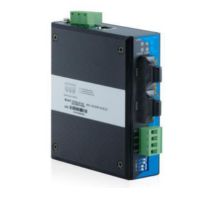
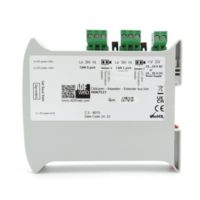
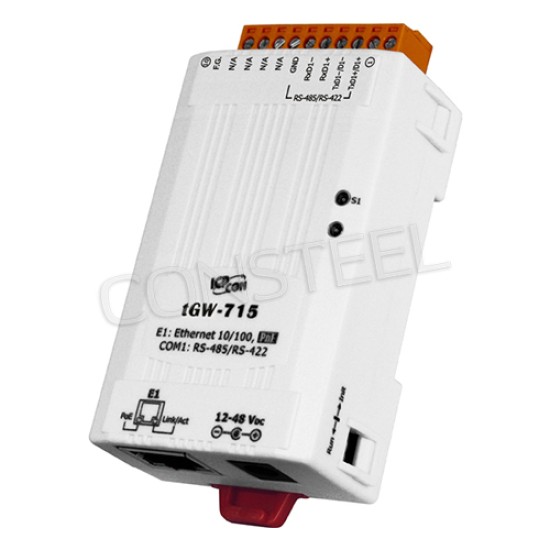
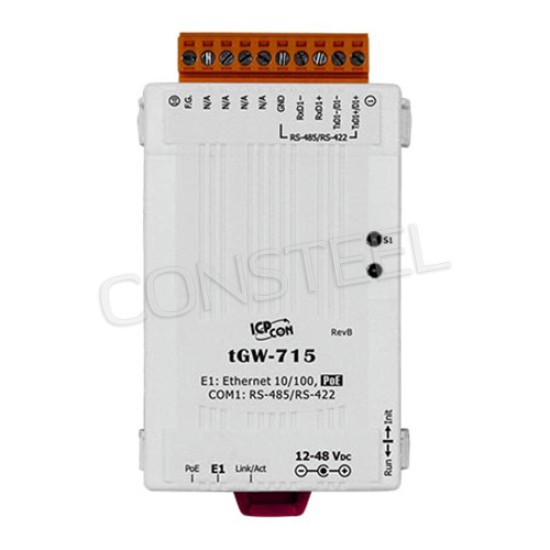
tGW-715 CR - Modbus TCP to RTU/ASCII Converter with PoE
tGW-715 is Modbus TCP to RTU/ASCII Converter with PoE, cert CE/UL.


- Stock: 2-3 weeks
- Brand: ICPDAS
- Model: tGW-715 CR
Full design package: User manual, CE declaration, CAD, PDF, certificates and test reports
If you're preparing technical documentation or an installation design, you can receive a complete set of design materials for this model. This is a quick way to gather the required documents for audits, acceptance, or project documentation.
- Device User Manual
- CE Declaration of Conformity (EU Declaration of Conformity)
- Mechanical Drawings – CAD (STEP/DWG) or high-quality PDF
- Additional Certificates and Test Reports (if available for the model)
Industrial Modbus TCP to RTU/ASCII Converter with PoE and 1 RS-422/485.
The tGW-715 CR is a Modbus TCP to RTU/ASCII gateway that enables a Modbus/TCP host to communicate with serial Modbus RTU/ASCII devices through an Ethernet network, and eliminates the cable length limitation of legacy serial communication devices. The module can be used to create a pair-connection application (as well as serial-bridge or serial-tunnel application), and can then route data over TCP/IP between two serial Modbus RTU/ASCII devices, which is useful when connecting mainframe computers, servers or other serial devices that use Modbus RTU/ASCII protocols and do not themselves have Ethernet capability.
Key protocol behavior for tGW-715 CR (Modbus TCP/UDP ↔ Modbus RTU/ASCII):
- Serial throughput & master fan-in: for the tGW-71x family the gateway allows up to 32 concurrent Modbus TCP/UDP master connections per serial port, which matters when multiple SCADA/HMI clients share one RS-485 segment.
- Modbus TCP ports mapping: the default mapping for the series is COM1 = TCP 502 (other models may use 503/504 for additional COM ports), so keep firewalls/NAT rules aligned with the actual port in use.
- Max serial line parameters: serial baud rate up to 115200 bps; supported data bits 5/6/7/8, parity None/Odd/Even/Mark/Space, stop bits 1/2.
- RTU timing controls: Modbus RTU requires an inter-frame gap equivalent to 3.5 character times; the device exposes a Char Timeout (configured in bytes, valid range 4–15) to decide when a response frame is complete.
- Response protection & error transparency: you can enable/disable checks that translate serial-layer issues into explicit Modbus exceptions (invalid RTU format → 0x41; CRC error handling including 0x43; slave/data timeouts → 0x0B / serial still sending when timeout triggers → 0x4B; queue full → 0x06 busy), which makes troubleshooting from the Modbus TCP side significantly faster.
- Read-cache for multi-master setups: a configurable read-cache window (10…65530 ms, disable = 0) can reduce RS-485 load and improve Modbus TCP/UDP response time when several masters poll the same registers repeatedly.
- Connection hygiene: the gateway can auto-close an idle Modbus TCP connection after a configurable period (Connection Idle, 1…65535 s, disable = 0) to avoid “stale” sessions occupying sockets.
The tGW-715 CR module features a powerful 32-bit MCU to enable efficient handling of network traffic, and also has a built-in web server that provides an intuitive web management interface that allows users to modify the configuration of the module, including the DHCP/Static IP, the gateway/mask settings and the serial port settings.
Commissioning notes (network + web access) for tGW-715 CR:
- Factory default network: IP 192.168.255.1, Subnet Mask 255.255.0.0, Gateway 192.168.0.1, DHCP Disabled by default. After saving new settings, they typically take effect within 2 seconds.
- Web login: default password is admin. The web interface supports an auto-logout timer (minutes) to reduce risk of leaving a session open on shared engineering laptops.
- HTTP port: the web server can be moved from the default 80 to a custom value (e.g., 81), but note that changing the HTTP port requires a restart and you must append the port in the browser (IP:PORT).
- Network Watchdog: a System Timeout (Network Watchdog) can reboot the gateway if there is no network activity for the configured time (range 30–65535 seconds; disable = 0). This is useful in remote sites where a hung TCP stack must recover autonomously.
- Firmware update mode: the device uses a Run/Init concept; firmware operations run in Run, while updates require initialization (Init) depending on firmware/update method. Plan remote access (local LAN reachability) before initiating updates.
The module offers true IEEE 802.3af-compliant (classification, Class 1) Power over Ethernet (PoE) functionality using a standard category 5 Ethernet cable to receive power from a PoE switch such as the NS-205PSE. If there is no PoE switch on site, the module will also accept power input from a DC adapter. The tGW-700 module is designed for ultra-low power consumption, reducing hidden costs from increasing fuel and electricity prices, especially when you have a large number of modules installed. Reducing the amount of electricity consumed by choosing energy-efficient equipment can have a positive impact on maintaining a green environment.
Power, mechanics and environment (deployment realities):
- Power inputs: PoE per IEEE 802.3af Class 1 or DC jack +12 to +48 VDC.
- Typical power consumption reference: 0.07 A @ 24 VDC (useful for cabinet PSU sizing when PoE is not used).
- Ethernet: 10/100 Base-TX RJ-45 with auto-negotiation and auto MDI/MDIX.
- Mounting: designed for DIN-rail installation; keep the wiring strain-relieved to avoid terminal micro-movements in vibrating cabinets.
- Temperature: operating range -25 to +75 °C, storage -30 to +80 °C; humidity 10–90% RH non-condensing.
RS-422/RS-485 wiring checklist for tGW-715 CR (to prevent “random timeouts”):
- Twisted pair required for DATA+/DATA- (D+/D-). Keep stubs short and avoid star topologies on RS-485.
- Termination: in long runs, termination may be required at both ends of the bus; a typical value is 120 Ω across DATA+ and DATA-.
- Common reference: usually you should connect signal grounds of RS-422/RS-485 devices together to reduce common-mode voltage between devices (helps especially in mixed-vendor systems).
- Polarity naming caveat: DATA+ may be labeled as B and DATA- as A on some devices (but not always). Verify the convention on each slave before commissioning.
- Terminal mapping: for the tGW-715 family the RS-485/RS-422 terminal block exposes TxD1+/D1+, TxD1-/D1-, RxD1+, RxD1-, plus GND and frame ground (F.G.)—use the correct 2-wire vs 4-wire scheme according to your field devices.
Features:
- Cost-effective Modbus/TCP to RTU/ASCII Gateway
- Supports Modbus TCP/UPD/RTU/ASCII master and slave
- 10/100 Base-TX Ethernet, RJ-45 x 1 (Auto-negotiating, auto MDI/MDIX)
- Supports TCP, UDP, HTTP, DHCP, BOOTP and TFTP protocols
- Supports UDP responder for device discovery
- Configuration via web server
- Easy firmware update via Ethernet
- Redundant power inputs: PoE (IEEE 802.3af, Class 1) and DC jack
Practical answers for integrators: IP defaults, RS-485 wiring, timeout tuning, multi-master behavior and pair-connection over TCP/IP.
? What are the factory default IP settings and web password for tGW-715 CR? ▾
Default network settings are IP 192.168.255.1, subnet mask 255.255.0.0, gateway 192.168.0.1 with DHCP disabled. The default web password is admin. After changing IP/Mask/Gateway, settings take effect within about 2 seconds and you should re-scan the device on the LAN.
? How many Modbus TCP/UDP masters can connect to tGW-715 CR at the same time? ▾
For the tGW-71x class, the gateway supports up to 32 concurrent master connections per serial port. In multi-master polling, consider enabling Read Cache to reduce RS-485 load and stabilize response times.
? tGW-715 CR returns timeouts or “busy” responses — which exception codes should I expect? ▾
If enabled in the gateway settings, typical diagnostics are: 0x0B when there is no slave response before the serial timeout, 0x4B when the slave is still sending data when the timeout triggers, and 0x06 if the request queue is full (busy). These codes let you distinguish “no reply on RS-485” vs “line is active but too slow” vs “overloaded by too many requests”.
? How should I tune Slave Timeout / Char Timeout on tGW-715 CR for slow RTU devices? ▾
Slave Timeout is the main “wait for response” timer on the serial side (default 300 ms) and should be set lower than the response timeout in your Modbus TCP client/SCADA. Char Timeout is frame completion logic for RTU (valid range 4–15 bytes) and helps the gateway decide when the response ended. For slow slaves, also consider adding Silent Time between requests to keep the bus quiet and reduce collisions.
? RS-485 wiring on tGW-715 CR: do I need termination and a common ground? ▾
Use twisted pair for DATA+/DATA- and, for longer runs, terminate the bus at the ends with a typical 120 Ω resistor across the pair. In most real installations you should connect signal grounds between RS-485 devices to reduce common-mode voltage (especially with mixed power supplies). Always verify vendor naming of A/B vs DATA+/DATA- before powering up.
? What is Read Cache on tGW-715 CR and when should I enable it? ▾
Read Cache is designed for scenarios where several Modbus TCP/UDP masters poll the same RTU/ASCII data. Within the cache window (configurable in milliseconds; disable = 0), the gateway can respond faster and reduce repeated serial transactions, which lowers RS-485 utilization and mitigates intermittent timeouts under load.
? How does pair-connection work on tGW-715 CR (serial-tunnel / serial-bridge over TCP/IP)? ▾
Pair-connection links two gateways so Modbus messages can be routed over TCP/IP between two serial endpoints. One unit typically acts as Server and the other as Client; you configure the remote IP and TCP port, and map RTU Virtual ID / TCP Slave ID (1–247) so the serial side can reach the intended TCP-side slave identity.
? I changed the web interface port on tGW-715 CR and now “the page is blank” — what to check? ▾
After changing the HTTP port, the device must be restarted and you must access it using IP:PORT (example: 10.0.8.123:81). If you use Internet Explorer, browser cache settings can cause blank-page behavior; switching to Chrome/Firefox and clearing cache usually resolves access issues.
? Which TCP port should I open on the firewall for Modbus TCP to tGW-715 CR? ▾
By default, the gateway uses TCP 502 for Modbus TCP on COM1. If your installation changes the local Modbus TCP port, ensure firewall rules match the configured value. Also consider the Connection Idle setting (seconds) if sessions are being dropped after inactivity.
Features:
- Cost-effective Modbus/TCP to RTU/ASCII Gateway
- Supports Modbus TCP/UPD/RTU/ASCII master and slave
- 10/100 Base-TX Ethernet, RJ-45 x 1 (Auto-negotiating, auto MDI/MDIX)
- Supports TCP, UDP, HTTP, DHCP, BOOTP and TFTP protocols
- Supports UDP responder for device discovery
- Configuration via web server
- Easy firmware update via Ethernet
- Redundant power inputs: PoE (IEEE 802.3af, Class 1) and DC jack
Manufacturer's warranty: 12 months
| General technical parameters | |
| Ethernet | 1x 10/100BaseT(X) PoE |
| Serial port | 1x RS-485/422 |
| Protocol support | Modbus TCP, Modbus RTU, Modbus ASCII |
| Industrial grade | |
| Casing | Plastic |
| Operating temperature | -25°C to 75°C |
| Input voltage | Port powered, 12~48VDC |
| Mount | DIN rail |