IN485UNI001I100 – Universal IR to Modbus RTU Interface for AC Integration
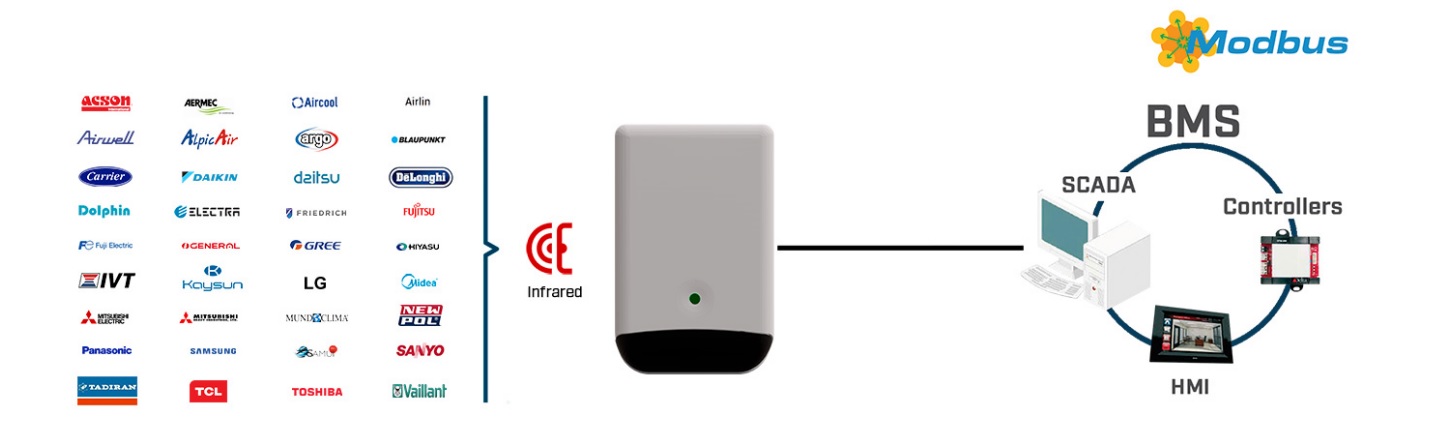
IN485UNI001I100 is an universal IR to Modbus RTU gateway for integrating air conditioners with Modbus systems. Fast installation and IR remote learning.
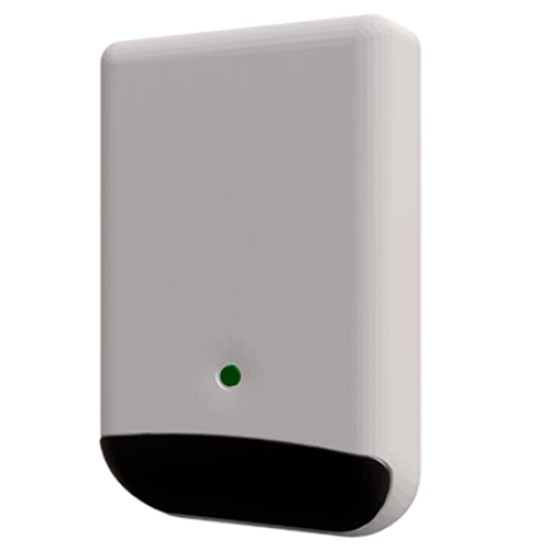
- Stock: 5-7 days
- Brand: Intesis
- Model: IN485UNI001I100
Full design package: User manual, CE declaration, CAD, PDF, certificates and test reports
If you're preparing technical documentation or an installation design, you can receive a complete set of design materials for this model. This is a quick way to gather the required documents for audits, acceptance, or project documentation.
- Device User Manual
- CE Declaration of Conformity (EU Declaration of Conformity)
- Mechanical Drawings – CAD (STEP/DWG) or high-quality PDF
- Additional Certificates and Test Reports (if available for the model)
Universal IR to Modbus RTU Gateway for HVAC Control.
The IN485UNI001I100 is a versatile gateway designed to integrate air conditioners controlled via infrared (IR) into Modbus RTU (EIA-485) automation networks. This solution enables centralized control and monitoring of AC systems using IR remote commands, making it ideal for both residential and commercial building management systems (BMS).
IN485UNI001I100 – what “IR to Modbus RTU” means in commissioning terms
This gateway acts as a deterministic “translator” between two worlds: it sends IR command frames toward the indoor unit and exposes HVAC points as Modbus registers for the BMS/PLC. A key practical benefit is the IR receiver: the gateway can listen to the handheld remote and keep the Modbus status aligned with what users actually do locally, instead of relying only on the last value written from the Modbus master.
The interface is compatible with most air conditioner brands featuring built-in IR receivers. Whether your HVAC unit is a wall-mounted split system, cassette-type, or compact ceiling unit, this interface can provide a reliable link to your Modbus network.
Placement strategy: four emitters + one receiver, and why location matters
The IR front-end is designed for real installations, not lab conditions: two emitters face forward and two are angled downward (45°), increasing the chance of clean reception by the indoor unit even when the gateway cannot be mounted directly “in front of” the AC. In difficult rooms (recessed units, curtains, furniture), IR reflections can be the difference between stable control and intermittent misses. Use a location that preserves a consistent line-of-sight (or predictable reflections) to the indoor unit’s IR window.
Equipped with four high-performance IR emitters and a single IR receiver, the IN485UNI001I100 ensures bidirectional communication with the AC unit. Two emitters face forward, and two are angled downward at 45°, ensuring a broad IR coverage area. The IR receiver listens for feedback from the handheld remote, allowing accurate status updates within your Modbus system.
Installation is extremely flexible: the device supports wall mounting, desktop placement, or positioning near the AC unit – in front, to the side, or underneath. Its compact form factor enables deployment even in space-constrained environments without compromising signal quality.
EIA-485 wiring discipline: A/B polarity, SGND, and “why CRC errors happen”
Treat the Modbus RTU side as a proper EIA-485 fieldbus: keep a line topology (avoid star wiring), use twisted pair for A/B, and stay consistent with polarity across the entire segment. If you see timeouts or CRC errors, the most common causes are physical-layer issues (polarity swaps, double termination, missing biasing, noise pickup from power cables, and inconsistent shield/ground bonding). In multi-zone buildings, a clean EIA-485 layout is often more important for reliability than any software setting.
The device communicates as a Modbus RTU Slave and supports baud rates ranging from 2400 to 115200 bps, with options for both 8N2 and 8N1 transmission formats. Its registers conform to 16-bit unsigned Holding Register format in standard Modbus big endian notation, ensuring compatibility with a wide range of PLCs, SCADA systems, and industrial controllers.
Modbus function support and a common integration pitfall (write-multiple behavior)
In typical PLC/BMS integrations, reads are done with standard holding-register polling, and writes use single-register operations for deterministic behavior. If your controller is configured to “batch-write” multiple registers in one telegram, validate that the gateway accepts the chosen write strategy. When troubleshooting “writes that do nothing,” the first check should be whether the master is attempting multi-register writes in one request instead of single-register writes.
Register model: map control points vs. diagnostics (alarms, error codes, runtime counters)
For commissioning, separate your point list into two groups:
- Control: On/Off, mode selection, fan speed, setpoint, louver position.
- Diagnostics: alarm status, device error code, and runtime counters (useful for maintenance workflows like filter service).
This approach makes it easy to build stable sequences (schedules, occupancy logic) while also enabling service monitoring in the same Modbus network.
An integrated 120 Ω termination resistor can be enabled via DIP-switch for bus stabilization. Additionally, the interface supports installation in networks using Modbus RTU EIA-485 Masters with built-in termination or fail-safe biasing features.
Termination and fail-safe biasing: when to enable the 120 Ω DIP and when not to
Use termination only at the physical ends of the EIA-485 trunk. If the gateway is installed mid-line, keep termination off to avoid “over-termination,” which often causes intermittent communication that looks like random timeouts. For fail-safe biasing, ensure the segment has a defined idle state (one intentional bias point per segment). If your Modbus master already provides biasing, avoid duplicating bias networks everywhere—too much biasing can distort levels, especially on longer runs.
A unique auto-learn function allows the gateway to capture and store commands from the IR remote control of the AC unit. This functionality extends compatibility to virtually any IR-controlled air conditioner, including those not explicitly listed in predefined compatibility databases.
Auto-learn: how to use it safely in retrofit projects
Auto-learn is the “retrofit enabler” when the indoor unit is not in a predefined database. In practice, you should capture the exact set of commands you plan to expose to Modbus (power, mode, fan, setpoint, louvers) and then validate repeatability from the final mounting location. If a learned command is sporadic, the issue is usually IR path/placement rather than Modbus polling.
Parrot Mode: quick field test for IR coverage before you blame Modbus
When you suspect IR coverage issues, use the gateway’s Parrot Mode as a commissioning tool: it allows you to validate whether the gateway can reliably “see” the remote control and propagate IR frames toward the indoor unit from the intended mounting position. This avoids the classic trap of debugging Modbus telegrams when the real problem is simply IR visibility.
Each Modbus RTU network can accommodate up to 63 individual IN485UNI001I100 interfaces. This allows for scalable HVAC integration across multi-zone systems. The unit includes a mini USB port for optional configuration and is also used for powering the device. A global power adapter kit is provided, featuring plugs for EU, UK, USA, and AU regions.
Scaling to dozens of nodes: polling rate, bus loading, and “don’t spam the AC with repeats”
When you approach the upper range of nodes on one Modbus RTU segment (e.g., dozens of gateways), stability depends on engineering choices: reduce unnecessary polling frequency for slow-changing points, avoid repetitive writes of identical values, and keep telegram sizes minimal. A good pattern is: fast polling only for status/alarms needed for control, slower polling for setpoints and runtime counters, and event-driven logic in the BMS where possible.
Key Features:
- Integration of IR-controlled AC units into Modbus RTU EIA-485 networks
- Brand-independent support for infrared-enabled HVAC units
- Four IR emitters and one IR receiver ensure comprehensive signal exchange
- Wall, desktop, or flexible mounting near the air conditioner
- Auto-learn mode for capturing remote IR signals quickly and easily
- Modbus RTU Slave functionality with 8N1 and 8N2 protocol support
- Configurable baud rate: 2400 to 115200 bps
- Built-in 120 Ω resistor enabled via DIP-switch for network termination
- Mini USB port for optional setup and for power input
- Power adapter with interchangeable plugs (EU, UK, USA, AU)
- Simultaneous control from Modbus master and IR remote
- Compact dimensions and non-intrusive installation
- 36-month manufacturer's warranty
Typical commissioning checklist for IN485UNI001I100 (field-ready)
- Confirm IR line-of-sight (or stable reflections) from the final mounting location.
- Validate EIA-485 wiring: A/B polarity consistency, clean line topology, correct termination only at ends.
- Lock the Modbus parameters: slave address, baud rate, and framing (8N1/8N2) consistent with the master.
- Define a stable polling strategy (avoid unnecessarily fast polls across many nodes).
- Validate local remote control coexistence and confirm status alignment in the BMS.
The IN485UNI001I100 is the ideal solution for retrofit HVAC projects, system expansions, or BMS integrations where standard air conditioning units need to be integrated into a centralized Modbus-based infrastructure. Reliable, scalable, and easy to configure, this gateway is a robust tool for system integrators and automation professionals.
Need help selecting the right IR integration solution? Contact our specialists here.
Practical answers for HVAC/BMS integrators: Modbus RTU EIA-485 wiring, termination/biasing, IR placement, and common causes of timeouts.
? How do I wire IN485UNI001I100 to Modbus RTU (EIA-485) to avoid CRC/timeouts? ▾
Use a line (daisy-chain) topology, keep A/B polarity consistent across the whole segment, and route the twisted pair away from power cables. Enable 120 Ω termination only at the physical ends of the trunk. CRC/timeouts are most often caused by polarity swaps, double termination, missing/incorrect biasing, or noise pickup.
? When should I enable the built-in 120 Ω termination DIP on IN485UNI001I100? ▾
Enable termination only if the IN485UNI001I100 is installed at one end of the EIA-485 segment. If it sits mid-line, leave termination OFF. Over-termination is a common cause of intermittent MS/TP/RTU stability issues (random read failures under load).
? What Modbus settings must match on the master for IN485UNI001I100? ▾
Match the slave address, baud rate (2400…115200 bps), and frame format (8N1 or 8N2) to what the master is configured for. If reads work but writes do not, verify the master’s write strategy (single-register writes are the safest baseline).
? How can I confirm the IR location is good before debugging Modbus? ▾
Start by validating IR coverage: place the gateway where it has a stable line-of-sight (or predictable reflections) to the indoor unit’s IR receiver. If local remote actions are not reliably “seen,” the BMS will show inconsistent status regardless of Modbus polling quality.
? Can users still control the AC with the handheld remote while using IN485UNI001I100? ▾
Yes—this is a typical deployment pattern. The IR receiver helps align reported status with what users do locally, while Modbus remains the centralized supervisory layer for schedules, setpoints, and monitoring.
? How do I scale to many gateways (up to 63) without slowing the bus? ▾
Use a disciplined polling plan: fast polling only for status/alarms needed for control, slower polling for setpoints and runtime counters, and avoid repetitive writes of identical values. Keep telegram sizes minimal and ensure only one intentional bias point per segment.
? Why do I see “writes succeed” on the PLC but the AC does not change? ▾
This is usually not a Modbus checksum issue—it’s either an IR coverage problem (the indoor unit does not receive the emitted IR frame) or an inappropriate write strategy (batch writes, timing, or repeated values). Verify IR placement first, then move to the master’s write behavior and timing.
? What is the most reliable way to validate a retrofit “auto-learn” setup? ▾
Capture exactly the commands you will expose to Modbus (power, mode, fan, setpoint, louvers), then test repeatability from the final mounting location. If some commands are intermittent, fix IR path and placement first—changing Modbus timing rarely solves an IR visibility issue.
? When should I enable the built-in 120 Ω termination DIP on IN485UNI001I100? ▾
Enable termination only if the IN485UNI001I100 is installed at one end of the EIA-485 segment. If it sits mid-line, leave termination OFF. Over-termination is a common cause of intermittent MS/TP/RTU stability issues (random read failures under load).
? What Modbus settings must match on the master for IN485UNI001I100? ▾
Match the slave address, baud rate (2400…115200 bps), and frame format (8N1 or 8N2) to what the master is configured for. If reads work but writes do not, verify the master’s write strategy (single-register writes are the safest baseline).
? How can I confirm the IR location is good before debugging Modbus? ▾
Start by validating IR coverage: place the gateway where it has a stable line-of-sight (or predictable reflections) to the indoor unit’s IR receiver. If local remote actions are not reliably “seen,” the BMS will show inconsistent status regardless of Modbus polling quality.
? Can users still control the AC with the handheld remote while using IN485UNI001I100? ▾
Yes—this is a typical deployment pattern. The IR receiver helps align reported status with what users do locally, while Modbus remains the centralized supervisory layer for schedules, setpoints, and monitoring.
? How do I scale to many gateways (up to 63) without slowing the bus? ▾
Use a disciplined polling plan: fast polling only for status/alarms needed for control, slower polling for setpoints and runtime counters, and avoid repetitive writes of identical values. Keep telegram sizes minimal and ensure only one intentional bias point per segment.
? Why do I see “writes succeed” on the PLC but the AC does not change? ▾
This is usually not a Modbus checksum issue—it’s either an IR coverage problem (the indoor unit does not receive the emitted IR frame) or an inappropriate write strategy (batch writes, timing, or repeated values). Verify IR placement first, then move to the master’s write behavior and timing.
? What is the most reliable way to validate a retrofit “auto-learn” setup? ▾
Capture exactly the commands you will expose to Modbus (power, mode, fan, setpoint, louvers), then test repeatability from the final mounting location. If some commands are intermittent, fix IR path and placement first—changing Modbus timing rarely solves an IR visibility issue.