








The Applications of Industrial Computers in Automation

Imagine bringing your shiny home laptop to a carpentry workshop. The air is thick with dust, the floor trembles from running machinery, and the temperature changes from hour to hour. How long would it survive? A day? Maybe two? In practice, its fan would quickly clog with dust, leading to overheating and irreversible failure.
Table of contents
- Introduction
- A Computer in Armor: What Truly Differentiates an Industrial Computer from a Regular PC?
- The Silence That Protects: How Do Industrial Computers Handle Heat Without Fans?
- From Vending Machines to Production Lines: Where Do You Unknowingly Use Industrial Computers?
- The Digital Eye of the Factory: How Do Industrial Computers Help Machines 'See'?
- The Brain or a Specialized Muscle? Industrial Computer (IPC) vs. PLC Controller
- How to Choose a Computer for the Production Floor: 3 Questions That Reveal Your Needs
- The Unseen Heroes: Why the World Would Stop Without Industrial Computers
This is precisely why a completely different species of computer reigns supreme in such conditions. It's the industrial computer (IPC)—the armored, all-terrain cousin of the device on your desk. Its primary purpose isn't user comfort but survival. Its entire construction, from the casing to the internal components, is designed with one goal in mind: reliable, 24/7 operation in the harshest environments.
The difference between an IPC and a regular PC is fundamental. While home hardware is open and air-cooled, a dust and vibration-resistant computer is most often a tightly sealed metal block with no fan at all. It dissipates heat through a specially designed chassis, which protects the delicate electronics from contaminants and shocks that would be fatal to a standard computer.
However, their role extends far beyond factory floors. These silent, durable devices are the hidden brains managing the world around us—from ticket machines and parcel lockers to airport systems and digital billboards. We'll explore what an industrial computer is, how it works, and where else we unknowingly rely on it every day.
A Computer in Armor: What Truly Differentiates an Industrial Computer from a Regular PC?
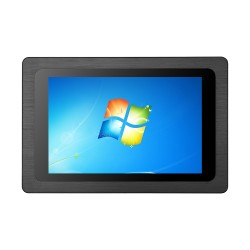
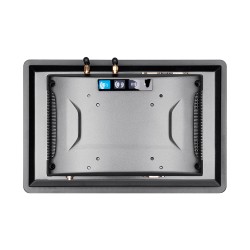
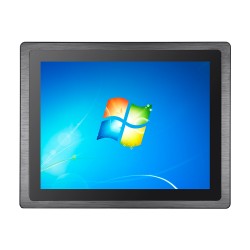
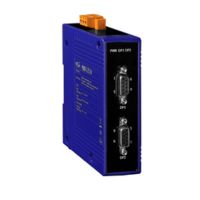
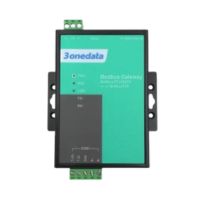
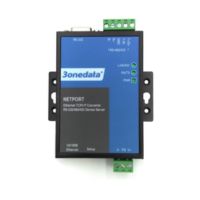
At first glance, the difference is striking. Instead of the lightweight plastic case you know from your desk, an industrial computer resembles a metal, armored box. This isn't a matter of style. This high-sealed enclosure acts like armor, protecting delicate electronics from dust, moisture, and even accidental impacts—everything that is commonplace in a factory, warehouse, or outdoors.
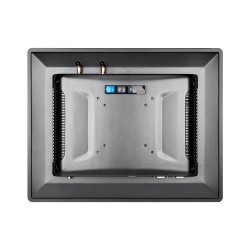
You'll also notice something missing from most of these devices: ventilation holes and loud humming. Many industrial computers have no fans. So how do they handle the heat? They use passive cooling, where the entire metal casing, often equipped with distinctive fins, acts as one giant heatsink. It draws heat away from the processor without any moving parts that could break down or suck in electronics-killing dust.
Now, imagine placing a home computer on a machine that constantly vibrates. The hard drive could quickly be damaged or components could come loose. Industrial computers are built for such conditions. Their internal structure is designed to provide resistance to vibrations and shocks, allowing them to work for years while bolted directly to the moving arms of robots or presses.
These three features—an armored case, no fan, and shock resistance—make the industrial computer a true tough guy of the tech world. It's not just a more powerful PC; it's a completely different category of hardware, designed to survive where others would have long since failed.
The Silence That Protects: How Do Industrial Computers Handle Heat Without Fans?
Anyone who has worked on a laptop knows the moment the fan kicks into high gear. While it seems essential, in the industrial world, this small component is a major point of failure. Its moving parts wear out, but worse, it acts like a vacuum cleaner, pulling in dust and moisture—the mortal enemies of electronics. In a dusty production hall or a humid environment, this is a direct path to a quick breakdown.
Industrial computers take a different approach. Instead of actively blowing air, they use their entire massive, metal chassis as one giant radiator. Heat from the processor is distributed across its surface, often covered with characteristic fins, and dissipated into the environment in complete silence. This simple and brilliant solution makes passive cooling in IPCs not only silent but, above all, much more reliable than traditional systems.
The absence of a fan is about more than just silence. It's the key to creating a sealed design that protects the delicate interior from everything outside. This is why a computer for high-temperature work can simultaneously be a machine resistant to dust and moisture. This remarkable durability allows it to operate flawlessly for years in places where a regular PC would give up after a few days.
From Vending Machines to Production Lines: Where Do You Unknowingly Use Industrial Computers?
This incredible resilience means that industrial computers have moved far beyond factory walls. You've likely interacted with them today without even realizing it. So, where are these silent, durable workers hiding? The answer is closer than you think.
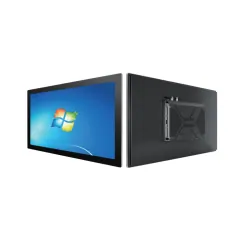
When you order food at a restaurant using a touchscreen or buy a ticket from a machine at the station, you're using a device whose heart is an industrial computer with a touchscreen. This panel PC must work flawlessly on a hot day as well as during a frost. The same goes for parcel lockers, which await us in all weather conditions, 24 hours a day. A regular tablet or computer couldn't handle such a challenge.
Other examples include parking systems that print tickets and handle payments at the barrier, and large-format advertising screens you see on buildings and at bus stops. This technology, known as Digital Signage, requires computers capable of uninterrupted operation for many months, resistant to temperature fluctuations and humidity. Reliability is key here—after all, no one wants to see a 'blue screen of death' in the middle of a city square.
These everyday examples are just the tip of the iceberg when it comes to the applications of computers in industrial automation. While their role in our environment is huge, they can do even more in factories. What if we told you that a computer can not only control a machine but also 'watch' it work?
The Digital Eye of the Factory: How Do Industrial Computers Help Machines 'See'?
What sounds like science fiction is a daily reality in modern factories. The ability of machines to 'see' is one of the most fascinating applications of computers in industrial automation. These systems, called Machine Vision systems, act like the human sense of sight but with superhuman precision and speed. At their heart is a durable industrial computer, which serves as the brain analyzing what the connected specialized camera 'sees'.
Imagine a production line where thousands of beverage bottles move at immense speed. How can you ensure that each one has a perfectly straight label and a properly sealed cap? A human couldn't inspect every single item at that pace—fatigue and a moment of inattention would quickly lead to errors. The machine needs reliable, digital eyes.
This is where a computer for vision systems comes into play. A camera mounted above the conveyor belt takes a picture of each passing bottle. In a fraction of a second, the image is sent to the industrial computer, which analyzes it for the slightest imperfections. It compares the photo to a stored template of the 'perfect bottle' and instantly decides whether the product meets the standards.
When the computer detects a defect—a crooked label or a poorly tightened cap—it sends a signal to another device on the line, such as a small pneumatic arm, which pushes the faulty product off the belt. This ensures that only top-quality items reach store shelves. This quality control process runs continuously, 24/7. The industrial computer is an intelligent analyst here, but must it always be the main brain of the operation?
The Brain or a Specialized Muscle? Industrial Computer (IPC) vs. PLC Controller
Although the industrial computer is an intelligent analyst, it rarely works alone in the world of automation. Its key partner is often the PLC (Programmable Logic Controller). To understand their relationship, let's imagine an efficient team in a factory. The PLC is like a highly skilled specialist—for instance, a welder who performs a single, repetitive task with superhuman precision. It's incredibly fast and reliable but focuses exclusively on its narrow job. The industrial computer (IPC) in this analogy is the manager of the entire team.
The manager (IPC) doesn't deal with every single movement of a robot arm. Its role is to see the bigger picture: it collects reports from all specialists (PLCs), analyzes overall performance, and makes strategic decisions. It issues a command like, 'Start production of the new product series,' and the PLC translates this into thousands of precise, physical actions. In this collaboration, the industrial computer and PLC controller don't compete; they complement each other. One provides complex intelligence, the other ensures flawless execution.
And how can the manager (IPC) oversee the work of an entire production hall at once? This is where a SCADA (Supervisory Control and Data Acquisition) system comes in. This advanced software, running on an industrial computer, acts as a digital cockpit for the entire factory. On a single screen, an operator can see in real-time what every machine is doing, receive alerts about failures, and analyze production data. Thanks to this integration, even the most complex production lines become transparent and easy to manage.
How to Choose a Computer for the Production Floor: 3 Questions That Reveal Your Needs
Knowing how versatile industrial computers are, one might think that choosing one is complicated. In reality, the process doesn't start with comparing processor speeds but with asking three simple questions that act as a compass pointing to the right solution. These questions determine whether you need an armored tank or an agile all-terrain vehicle.
A proper device selection comes down to answering the following:
- Where will it work? The environment is the absolute foundation. Will it be exposed to dust, vibrations, or extreme temperatures? The answer determines the type of enclosure, the need for passive cooling, and the level of resistance, often defined by special standards and certifications for industrial devices.
- What will it be connected to? The computer must 'talk' to other devices. Old but reliable machines might require serial ports (COM), which are hard to find on laptops. Vision systems, on the other hand, need fast connectors for cameras. That's why flexible box PCs often offer a whole range of diverse ports.
- What task will it perform? Simply displaying data on a screen requires a different level of computing power than real-time image analysis from several cameras. Only at this stage do you select the processor and memory, scaling the power precisely to the needs without overpaying for unnecessary performance.
Understanding these three pillars—environment, communication, and task—is the key to how to choose a computer for the production floor that will be a reliable partner for years.
The Unseen Heroes: Why the World Would Stop Without Industrial Computers
The world of technology around you now has one less mystery. It's no longer just a collection of screens and machines, but a system whose hidden foundation you can name. You understand why the computer on your desk wouldn't last a day in a factory and what makes its industrial counterpart a silent, armored hero of modernity.
This reliability is the very heart of the industrial computers. Its wide-ranging applications in industrial automation stem from one simple promise: it has to work, always. From its special construction to simplified service and maintenance, every element is dedicated to ensuring the continuity that keeps traffic lights from failing and packages in a sorting facility from going to the wrong place.
Next time you use a self-service checkout, a parcel locker in the rain, or see a robot arm in action, smile. You now know that inside, often in an unassuming metal box, one of these tough guys is working silently. And you can now see the technology that makes our world just work.